





Choose Primavera P6 for large, contract-driven, or EVM-mandated programs where enterprise governance and portfolio control matter more than convenience. Choose Microsoft Project for smaller or mid-scale single projects where speed of adoption, Microsoft 365 integration, and lower licensing cost outweigh institutional reporting requirements. The p6 vs ms project decision usually resolves itself once you know your contract terms and project scale, not the other way around.
- Pick P6 if: the owner or general contractor mandates Earned Value Management reporting, the schedule will exceed several thousand activities, or you manage multiple linked projects under one portfolio.
- Pick MS Project if: your team already lives in Microsoft 365, the project is single-site with a modest activity count, and you need schedulers productive within days, not weeks.
If neither description fits cleanly, the decision checklist further down maps specific project attributes to the right tool.
Key Takeaways
The right scheduling tool depends on contract terms and project scale far more than personal preference or feature comparisons.
| Point | Details |
|---|---|
| Contracts decide first | Check owner and contract requirements for P6 or EVM mandates before evaluating features. |
| Scale drives the choice | P6 handles large multi-project portfolios; MS Project suits single, moderate-complexity projects. |
| Baselines matter for claims | P6’s unlimited baselines support delay analysis better than MS Project’s roughly 11-baseline cap. |
| Hybrid workflows work | Keep P6 as the master schedule and use MS Project exports for site-level daily planning. |
| Governance beats tooling | Assign one baseline owner and a fixed publishing cadence regardless of which software you use. |
Where to Verify Features and Pricing
- Oracle’s EVM solution brief for current ANSI/EIA-748 compliance details.
- Microsoft’s Project product page for up-to-date plan tiers and integrations.
Table of Contents
- What Are the Main Differences Between P6 and MS Project?
- How Do P6 and MS Project Compare on Technical Scheduling Features?
- Which Project Profile Fits P6 or MS Project?
- Can You Run P6 and MS Project Together on the Same Project?
- What Does P6 Cost Compared to Microsoft Project?
- How Does Stellar Structures Approach Schedule Governance?
- Editorial Take: What the Data Actually Supports
- Sources
What Are the Main Differences Between P6 and MS Project?
Primavera P6 and Microsoft Project solve the same core problem, sequencing work and tracking progress, but they were built for different tiers of complexity. P6 was engineered for engineering, procurement, and construction (EPC) programs where contractual accountability and multi-year timelines are the norm. MS Project was built for broader project management use across industries, with construction as one use case among many.
The trade-off comes down to six dimensions that matter most to schedulers:
- Best for: P6 suits large capital programs and multi-project portfolios; MS Project suits single projects with moderate complexity.
- Scalability: P6 handles very large numbers of activities without slowdown; MS Project’s performance degrades as schedules grow beyond several thousand activities.
- EVM compliance: P6 offers native, ANSI/EIA-748-compliant Earned Value Management; MS Project calculates basic EVM metrics but doesn’t meet that institutional standard.
- Baselines: P6 allows unlimited baselines for delay analysis and claims; MS Project caps them, typically around 11.
- Cost: MS Project’s public pricing tiers are lower and transparent; P6 is usually enterprise-quoted and higher.
- Learning curve: MS Project onboards faster, especially for teams already using Microsoft 365; P6 takes longer but enforces stricter project-control discipline.
Contractual obligation often overrides personal preference entirely. Many infrastructure and EPC contracts specify P6 as the deliverable format, and submitting MS Project files in that context risks outright rejection, regardless of how well the schedule was built.
How Do P6 and MS Project Compare on Technical Scheduling Features?
Beyond the surface-level pitch, the real differences show up in how each tool handles scale, logic, and formal reporting, the details that decide whether a schedule survives a claims dispute or falls apart under scrutiny.
Scalability and activity limits. MS Project remains usable for schedules in the low thousands of activities, but responsiveness noticeably drops as file size and resource assignments grow. P6 is built and proven for tens of thousands of activities across linked projects, which is why owners on large infrastructure programs default to it.
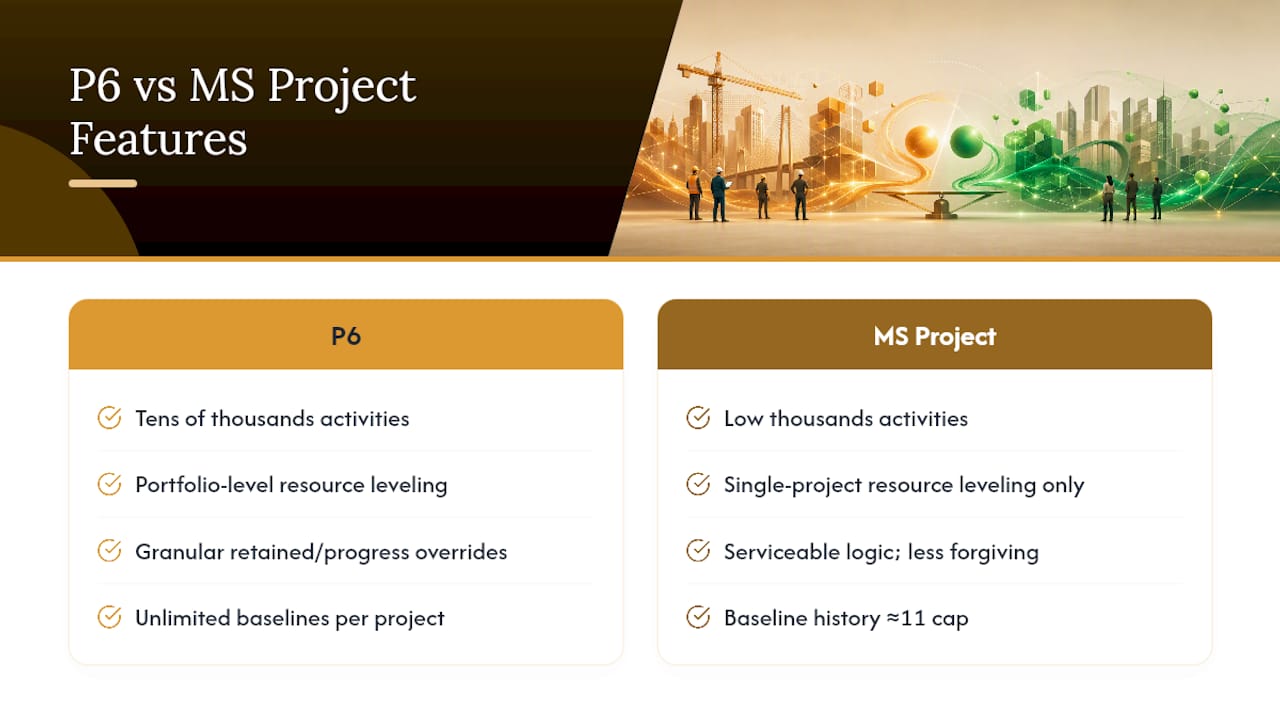
Dependency and logic control. Construction schedules live and die on how they handle out-of-sequence progress, work that starts or finishes outside its planned logic order. P6 offers more granular retained-logic and progress-override settings, letting schedulers preserve the original network logic while still reflecting field reality. MS Project’s logic handling is serviceable for simpler sequences but less forgiving when a site update breaks planned dependencies.
Baselines and claims readiness. P6 supports unlimited baselines against a single project; MS Project typically caps baseline storage around 11. For anyone doing delay analysis or preparing evidence for a claim, that ceiling matters. A capped baseline history means you may not have the comparison point you need six months into a dispute.
Resource leveling and portfolio management. P6’s leveling engine works across an entire portfolio, resolving resource conflicts between projects that share the same crews or equipment. MS Project’s leveling operates within a single project file, which is fine for standalone jobs but limited for firms running several concurrent contracts.
EVM and institutional reporting. This is the sharpest divide. P6’s earned value calculations (PV, EV, AC, CPI, SPI, EAC, VAC) meet the ANSI/EIA-748 standard that many government and defense-adjacent contracts require. MS Project’s EVM fields exist but generally don’t satisfy that compliance bar.
Data exchange and migration risk. Converting a P6 .xer file into MS Project’s XML format commonly causes data loss on advanced features, calendars, resource pools, and complex logic relationships don’t always survive the round trip cleanly.
Which Project Profile Fits P6 or MS Project?
Matching your project to the right tool gets easier once you look at real scenarios rather than feature lists in isolation.
A mega-infrastructure program (a transit line, a large hospital campus, a multi-phase industrial plant) almost always defaults to P6 because the owner’s contract specifies it and the activity count exceeds what MS Project handles comfortably. A firm running a multi-project portfolio, several mid-size commercial fit-outs happening in parallel with shared resources, also leans P6 for the cross-project leveling. A single commercial building project with a defined scope and a smaller team often does fine on MS Project, especially if the client has no EVM mandate. A residential renovation or small addition rarely needs either tool at enterprise depth; a lighter MS Project file usually suffices.
Run through this checklist before committing:
- How many activities will the schedule realistically reach at peak detail?
- How often do you need to publish and preserve baselines?
- Does the contract or owner mandate EVM reporting or ANSI/EIA-748 compliance?
- Do you need to level resources across more than one project simultaneously?
- Has the client specified a required deliverable file format?
- What’s the realistic budget for licensing and training given the project timeline?
Pro Tip: Don’t wait until mobilization to answer these questions. Run the checklist during procurement, before the contract is signed, so licensing and training costs are already budgeted rather than scrambled for later.
Can You Run P6 and MS Project Together on the Same Project?
Yes, and many practitioners already do. The pattern that works best keeps P6 as the master schedule holding the contractual baseline, while site teams work from simplified MS Project or Excel exports for daily planning and look-ahead views.
Making that work in practice means a few non-negotiables:
- Verify calendars match exactly before exporting; mismatched working days corrupt float calculations silently.
- Confirm resource pools and codes translate cleanly, since naming mismatches break rollups.
- Preserve retained logic settings on export so out-of-sequence progress doesn’t get misread downstream.
- Never treat an exported MS Project file as an editable source, changes made there should never flow back into P6 without review.
The biggest pitfall is ambiguity over ownership. If two team members believe they hold the authoritative schedule, conflicting versions circulate fast. Assign one scheduler as master-schedule owner, enforce strict baseline naming and version control, and set a fixed publishing cadence, weekly for active construction phases, so stakeholders always know which file is current.
What Does P6 Cost Compared to Microsoft Project?
P6 pricing is generally enterprise-quoted and not publicly listed as a flat rate, reflecting the server infrastructure, admin overhead, and per-seat licensing that come with deploying it across a program office. Microsoft Project publishes tiered plans on its own product page, covering options from lightweight web-based plans to full desktop licenses, generally at a fraction of P6’s enterprise cost.
The sticker price only tells part of the story. Total cost of ownership includes implementation, hosting, ongoing administration, training time, and, critically, the cost of not having defensible baseline evidence if a delay claim ever goes to arbitration. A cheaper license that can’t produce ANSI/EIA-748-compliant EVM reporting isn’t cheaper if the contract requires it. When license cost and contractual requirement conflict, the requirement wins every time.
- P6: higher upfront and ongoing cost, justified when contracts mandate EVM or claims-grade baseline history.
- MS Project: lower cost and faster deployment, justified when the project scope and contract terms don’t demand institutional-grade reporting.
How Long Does It Take to Learn Each Tool?
Ramp time differs sharply by role and depth needed. Schedulers can become productive in MS Project within days to a couple of weeks, especially with prior Microsoft 365 exposure. P6 typically takes two to twelve weeks depending on whether the role is basic schedule updates or full project-controls administration.
- Invest in vendor-backed P6 training and recognized scheduling practitioner programs for anyone owning the master schedule.
- Pair new P6 users with an experienced mentor for the first few live updates.
- Set MS Project templates and review standards early; its ease of use can otherwise encourage casual scheduling habits that erode data quality over time.
How Do These Tools Connect to Dashboards and Reporting?
MS Project’s advantage is ecosystem depth: native integration with Teams, SharePoint, and Power BI makes stakeholder reporting fast and familiar for teams already inside Microsoft 365. P6 ties into Primavera Risk Analysis and Oracle’s broader reporting stack, better suited to formal portfolio dashboards and claims documentation.
- Choose MS Project when deliverables are PowerPoint decks, Excel exports, or Power BI dashboards for internal stakeholders.
- Choose P6 when deliverables must hold up as formal claims evidence or feed enterprise portfolio reporting.
When Should You Avoid Both Tools?
Neither tool fits every scenario. Programs needing extreme performance simulation or specialized delay-analysis modeling often need dedicated forensic scheduling suites layered on top of either platform. Very small renovation jobs may not need formal scheduling software at all.
- If schedule quality is the real problem, fix governance and templates before switching tools.
- Reserve specialist delay-analysis software for contentious claims work, not routine updates.
How Does Stellar Structures Approach Schedule Governance?
On multidisciplinary projects spanning structural, geotechnical, and M&E scopes, Stellar Structures aligns tool selection to contractual and authority requirements rather than team preference. When a project mandates P6 deliverables, the firm enforces a documented baseline policy, a fixed reporting cadence, and one designated schedule owner as the single source of truth across disciplines.
- Baseline changes require sign-off before republishing to avoid silent version drift.
- Site teams often work from simplified exports while the master schedule stays in P6.
Pro Tip: On multi-discipline projects, assign baseline ownership to one person by name, not by role, ambiguity over “who owns the schedule” causes more rework than any software limitation ever will.
If your project involves navigating authority approvals alongside schedule governance, understanding how submission delays typically originate helps you plan realistic milestones from the outset. Firms managing multiple subcontractor schedules under one master program face the same single-source-of-truth challenge, regardless of which scheduling tool sits underneath.

Stellar Structures supports clients through the design, engineering, and authority submission stages where schedule discipline and documentation directly affect approval timelines. If your project needs coordinated architectural and engineering delivery alongside rigorous project controls, explore Stellar Structures’ architectural design services for commercial buildings to see how governance and design work together from the outset.
Editorial Take: What the Data Actually Supports
Most comparisons frame this as a feature war, more activities, more baselines, better EVM. That framing misses the real decision driver: contracts, not preferences, choose the tool in the majority of cases where P6 gets used at all. If your owner’s contract specifies P6 deliverables, the debate is already over before anyone opens either application.
Where conventional advice falls short is treating hybrid workflows as a compromise rather than a mature strategy. Running P6 as the contractual master schedule while site teams work from lighter MS Project exports isn’t cutting corners, it’s matching the tool to the task at each level of the organization. The failure mode isn’t picking the “wrong” software; it’s skipping the governance, baseline ownership, version control, publishing cadence, that makes either tool trustworthy.
Prioritize the checklist questions before the software demo. A team that knows its activity count, EVM obligations, and claims exposure will pick correctly almost every time. A team chasing features first usually ends up retrofitting governance onto a tool that was never the actual problem.
— Aman
Sources
- Global PM: Primavera P6 vs Microsoft Project — which is right for your construction project?
- Planned Ltd: Primavera P6 vs Microsoft Project
- Microsoft
Recommended
- Steel vs Concrete PPVC Construction in 2026
- Top 6 broadtechengineering.com Alternatives 2026
- Checklist for Developers Contractors Choosing the Right QP S and Supervision Team for Your Next Build in Singapore
- What a Project Manager Actually Does on Large Developments